The Project: Robust Performance Reviews
This project spanned three core areas of a performance review: the setup and configuration, the process of all parties completing an individual review, and the post-review process of analyzing data and making career decisions. I designed all three.
The work directly contributed to landing our two largest customers — 3SS (~400 employees) and Tools For Humanity (~600 employees) — both of which left established competitors due to their tools lacking the flexibility that we could provide. We have retained every customer that we gained during my two years at Topicflow.
My Role
As the only product designer at this small startup, I wore many hats. I owned the entire design process with regular check-ins from our CEO, managed the product by creating and prioritizing tickets across 4 engineers, led agile development ceremonies, and handled customer success — gathering research, fielding feature requests, and following up after releases.
The Core Experience (for the Majority of Users)
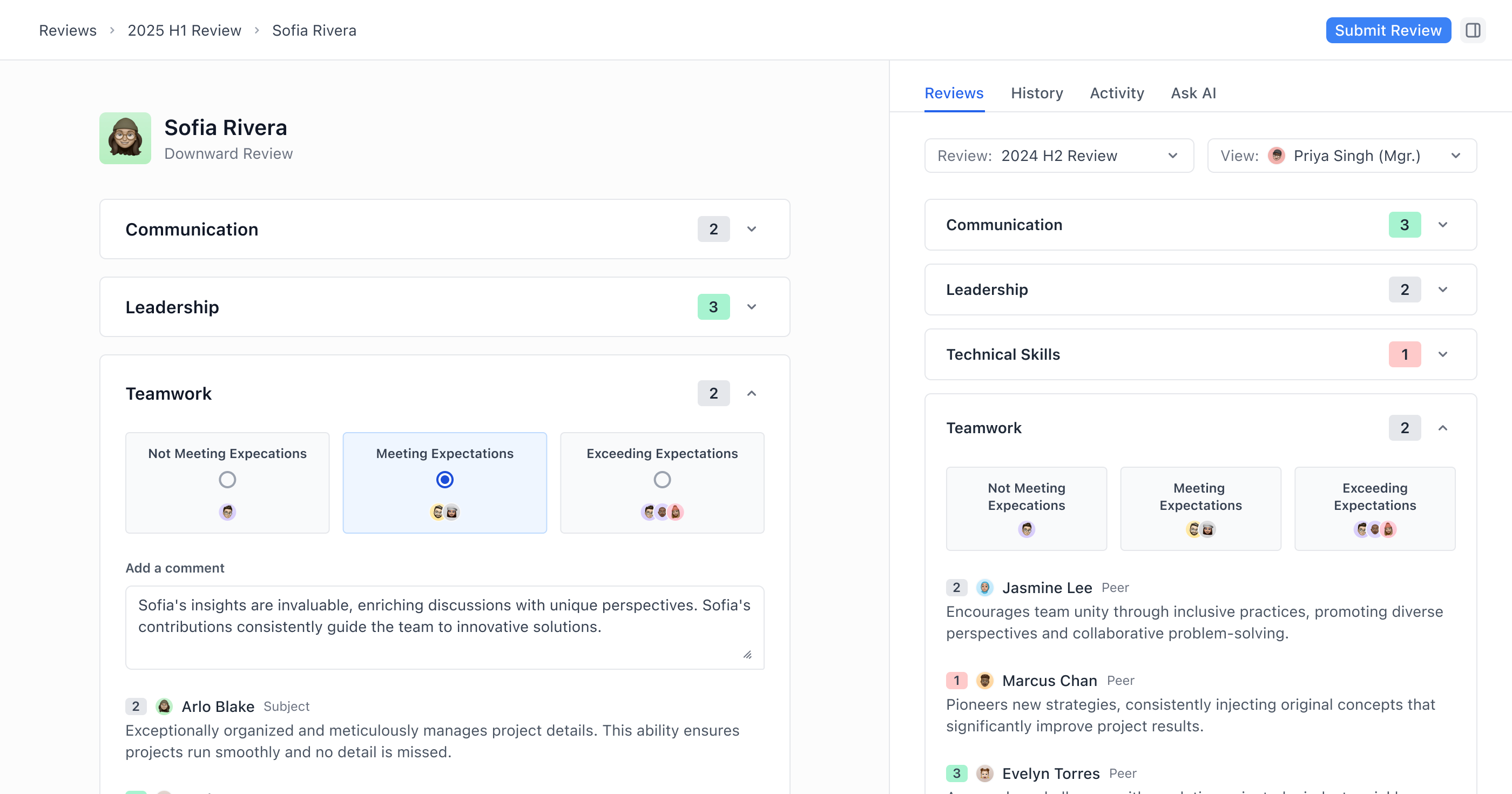
Those who utilize this tool are individual contributors, peers, and managers filling out performance reviews. A priority of ours was to ensure the objective of the tool was immediately obvious to the user, and that how to use it was intuitive. Many employees enter the app via an email or Slack notification, and for some, this may be their first exposure to Topicflow — so, clarity at first glance was essential.
1
A single page must serve individual contributors, managers, peers, and direct reports rather than creating separate views for each role.
2
The same page should be used during, and after the review process, meaning the design must stay consistent among different stages of the review.
3
Each persona has different permission levels, requiring content to be selectively shown or hidden, without feeling incomplete.
These layered constraints required careful use of information hierarchy and progressive disclosure throughout the design.
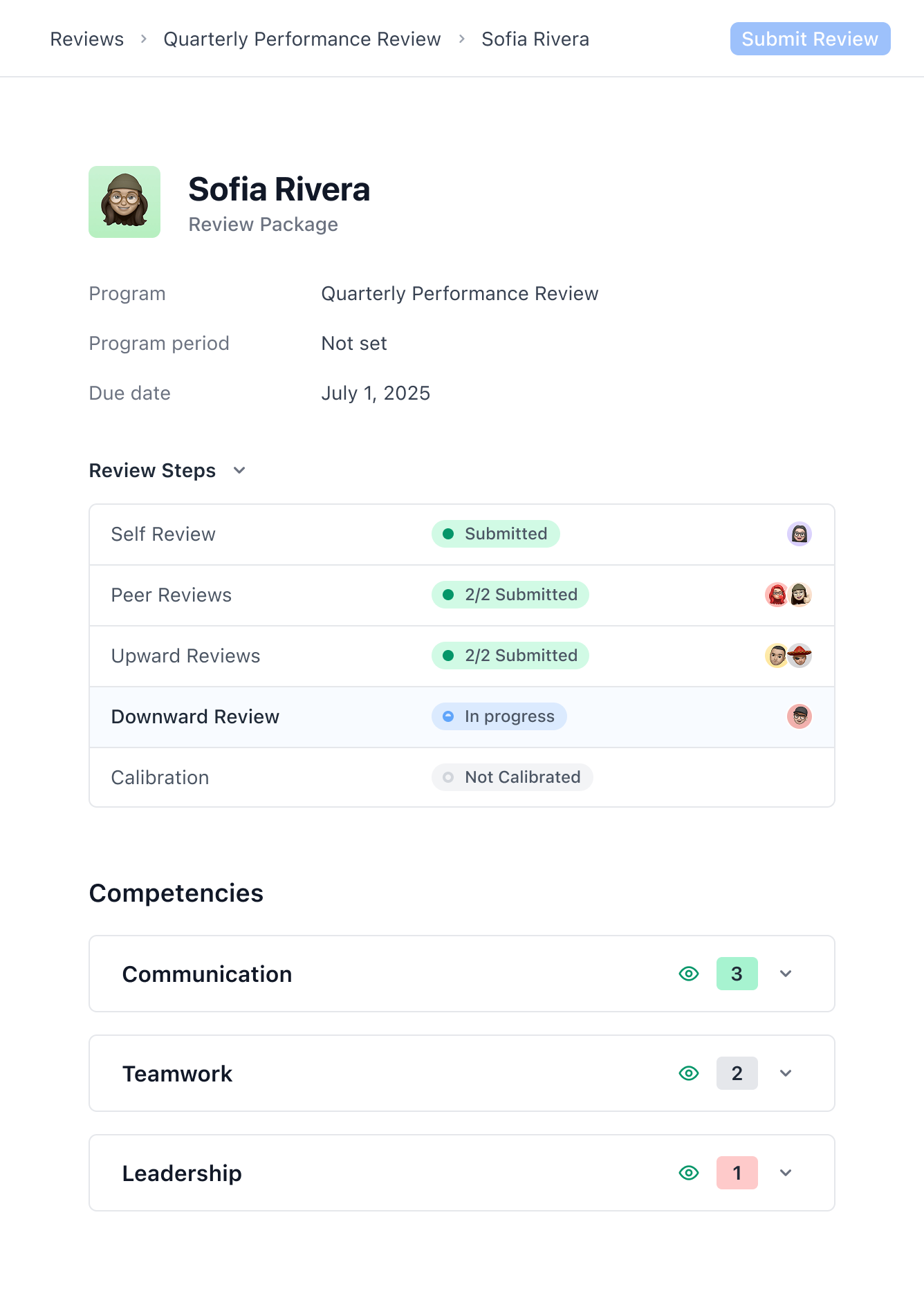
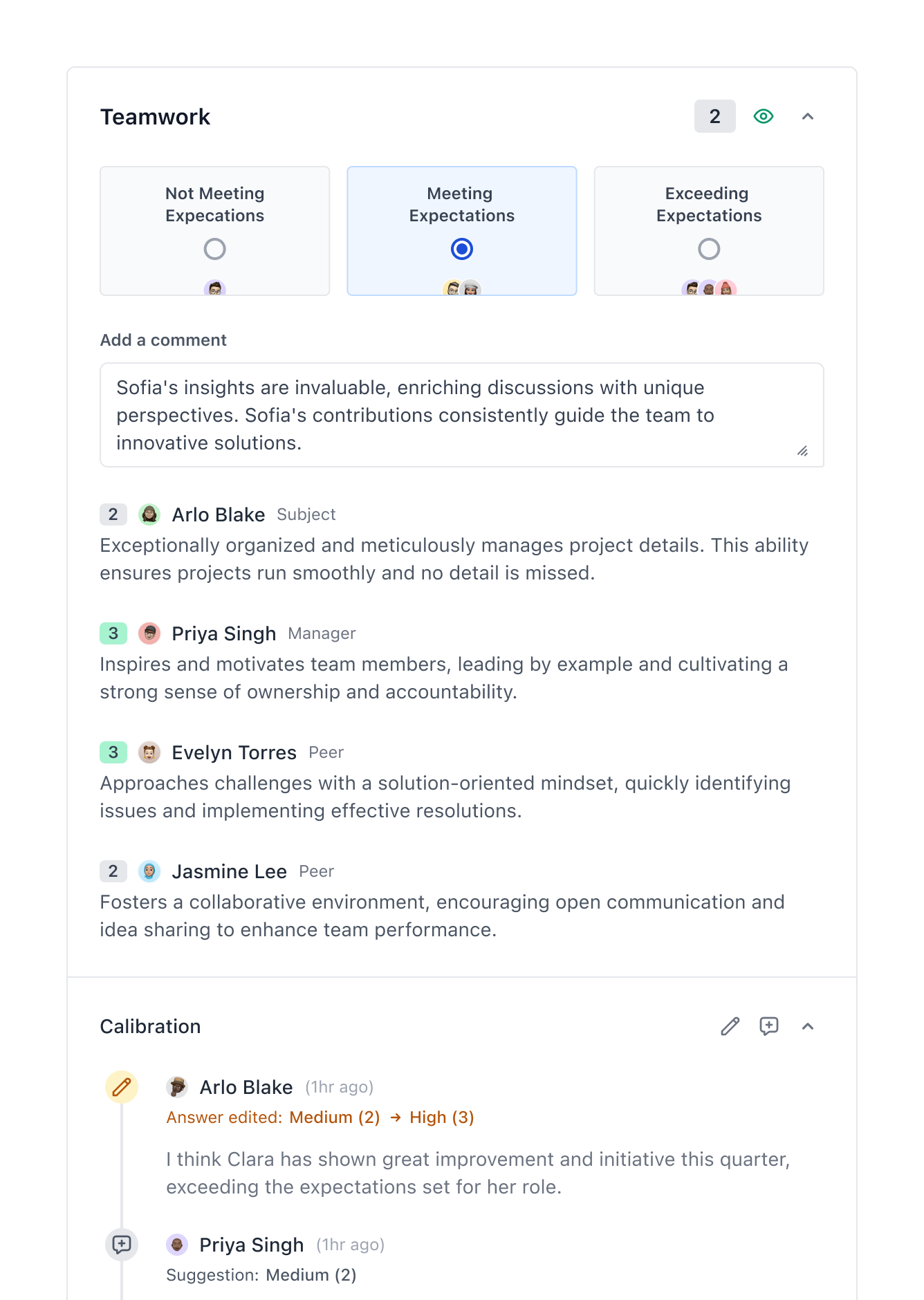
After numerous iterations, we landed on the design shown below. The first screenshot is an example of what a manager might see coming into a review process part-way through. The second screenshot shows an interaction for a manager, with a question that has already been answered by numerous other employees.
Problem #1: Context is Hard to Gather
Typically, performance reviews only happen a few times a year, but managers are asked to assess an entire 6-month, or year-long cycle. Too often, they only remember recent events, proving that providing a clearer picture that spans the entire time period that they’re evaluating is beneficial.
An Opportunity to Provide More Context
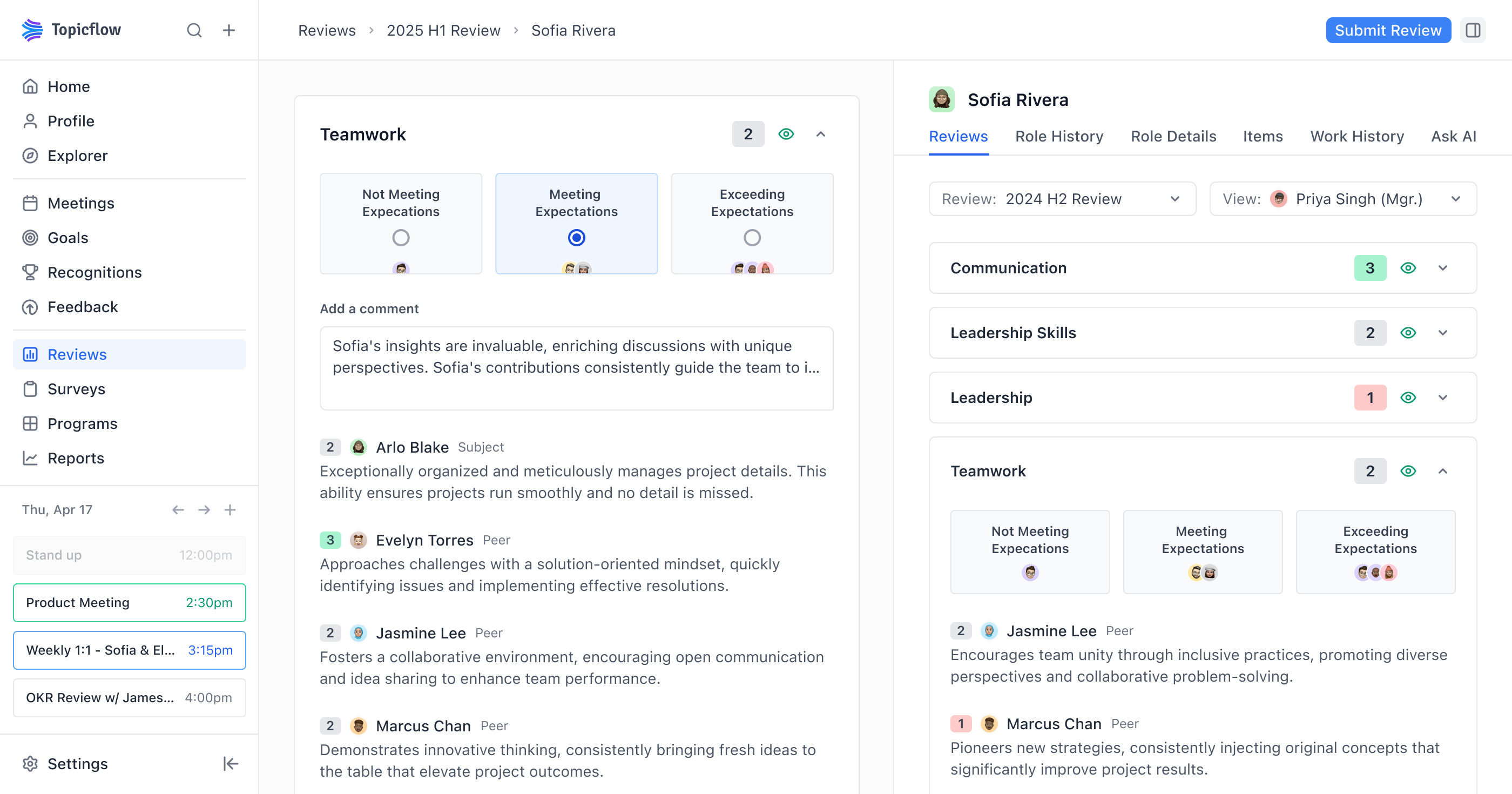
I proposed a persistent context panel that would follow users as they filled out a review. The idea was to surface relevant historical data right alongside each question, rather than ask managers to search through separate tools. After several rounds of iteration and testing, we narrowed down which data sources were most valuable.
1
To assess previous performance reviews and submissions from the current review cycle.
2
Role details, including competency metric.
3
To view previous work activity from meeting notes/transcripts, Slack, and integrations.
4
Help with getting started on a performance review question, and utilizing AI in supporting the user with examples, and evidence related to the current question.
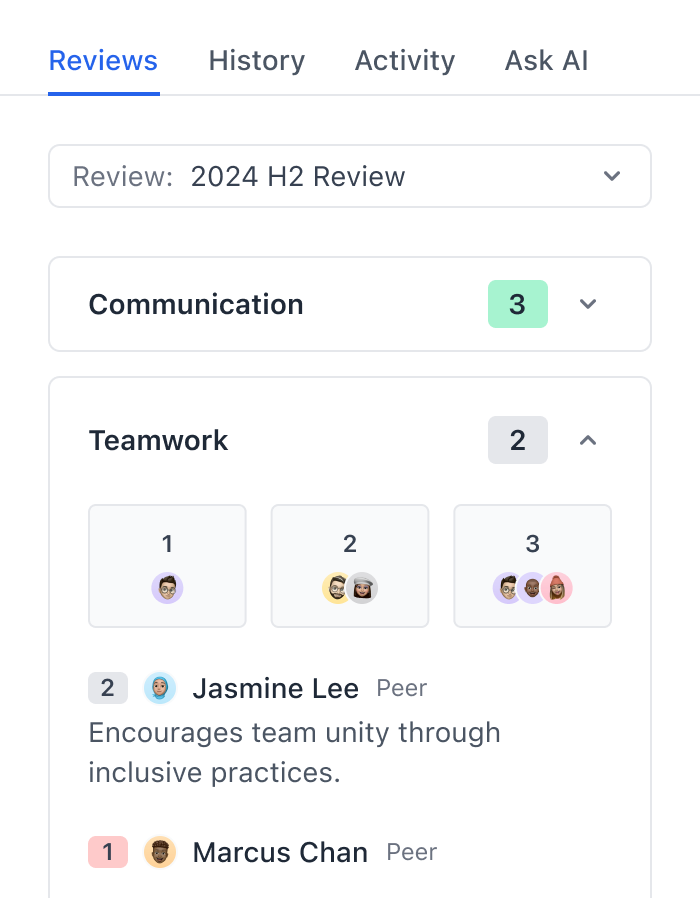
Here is an example: The left side shows the review you would be filling out, and the panel with additional context on the right. Additionally, there are 4 other tabs to switch between for this panel to give the user a wide range of context to reference efficiently.
Showing More Context
Within the context panel, you can see the following tabs to help the user answer the current question, and retrieve information that may be relevant. The panel is persistent, and follows the user as they fill out the review. This is information that would otherwise be scattered across multiple tools, making it difficult to gather quickly.
Outcome: Managers Were Using It
We received strong positive feedback on the context panel. The challenge was that the quality of the experience depended on users actually curating data — maintaining goals, using meeting transcription, and keeping records current. Not everyone did.
We leaned into this constraint by partnering closely with companies and managers who were already committed to thorough processes. For them, the payoff was significant: all the context they needed was surfaced in one place, eliminating the need to search through multiple tools during a review.
Problem #2: Every Company has a Different Process
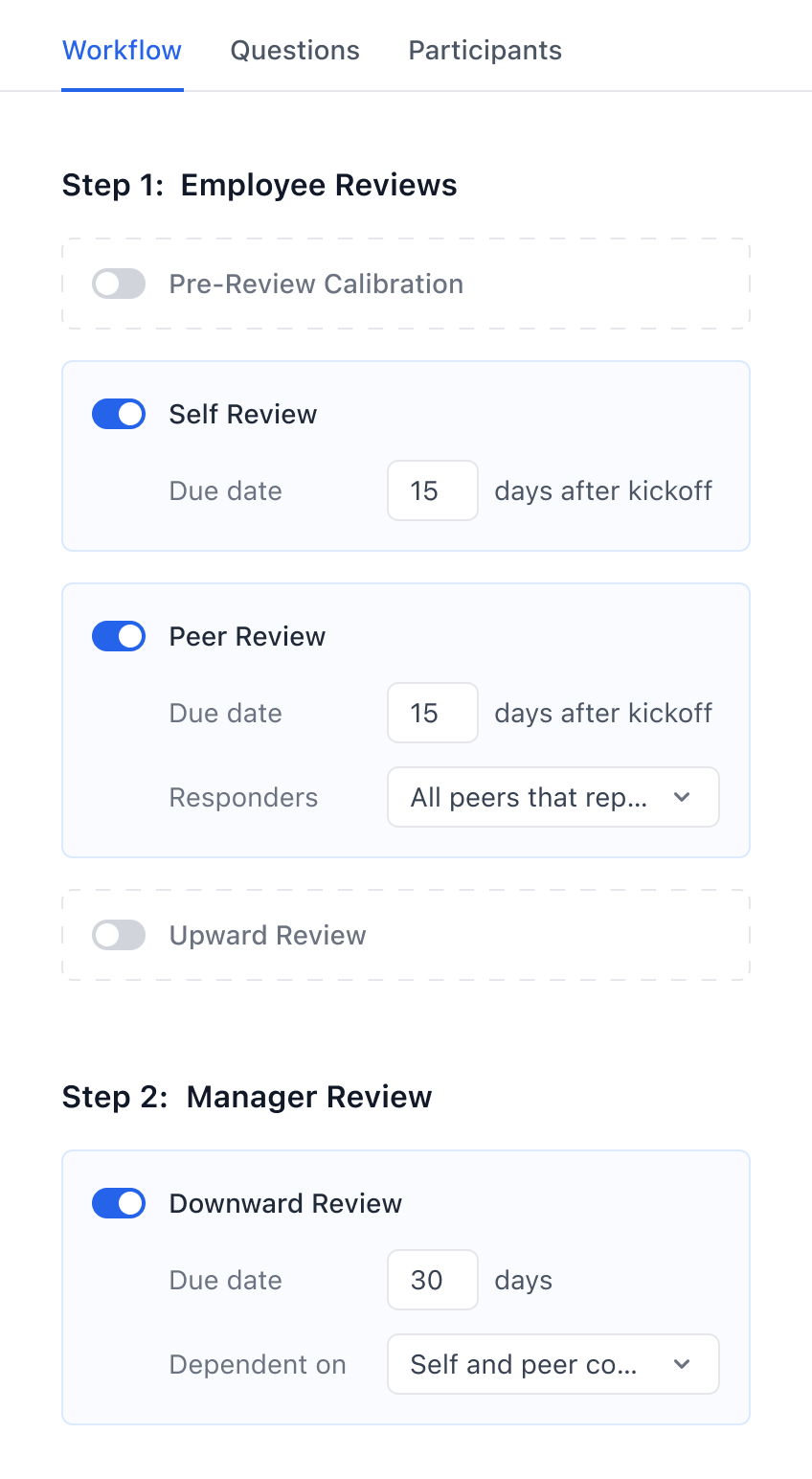
Performance reviews are widespread, but every organization runs them differently. The larger tools in the market offered rigid workflows that didn’t bend to match how teams actually operated. We saw a gap: if we could provide genuinely flexible configuration, we’d win customers that the incumbents were losing. For this problem, I will be discussing and showing examples related to the performance review settings pages.
Balancing Flexibility and Technical Constraints
Full flexibility sounds ideal for users, but it creates exponential complexity for the engineering team. I worked closely with our engineers to identify where we could offer meaningful customization, without creating an unmaintainable system. We interviewed existing teams to map the most common use cases, and spoke with prospective customers who were leaving other tools to understand exactly what was missing.
1
The ability to determine criteria for each stage in a review. Which stages exist, when they happen, and whether they're dependent on each other.
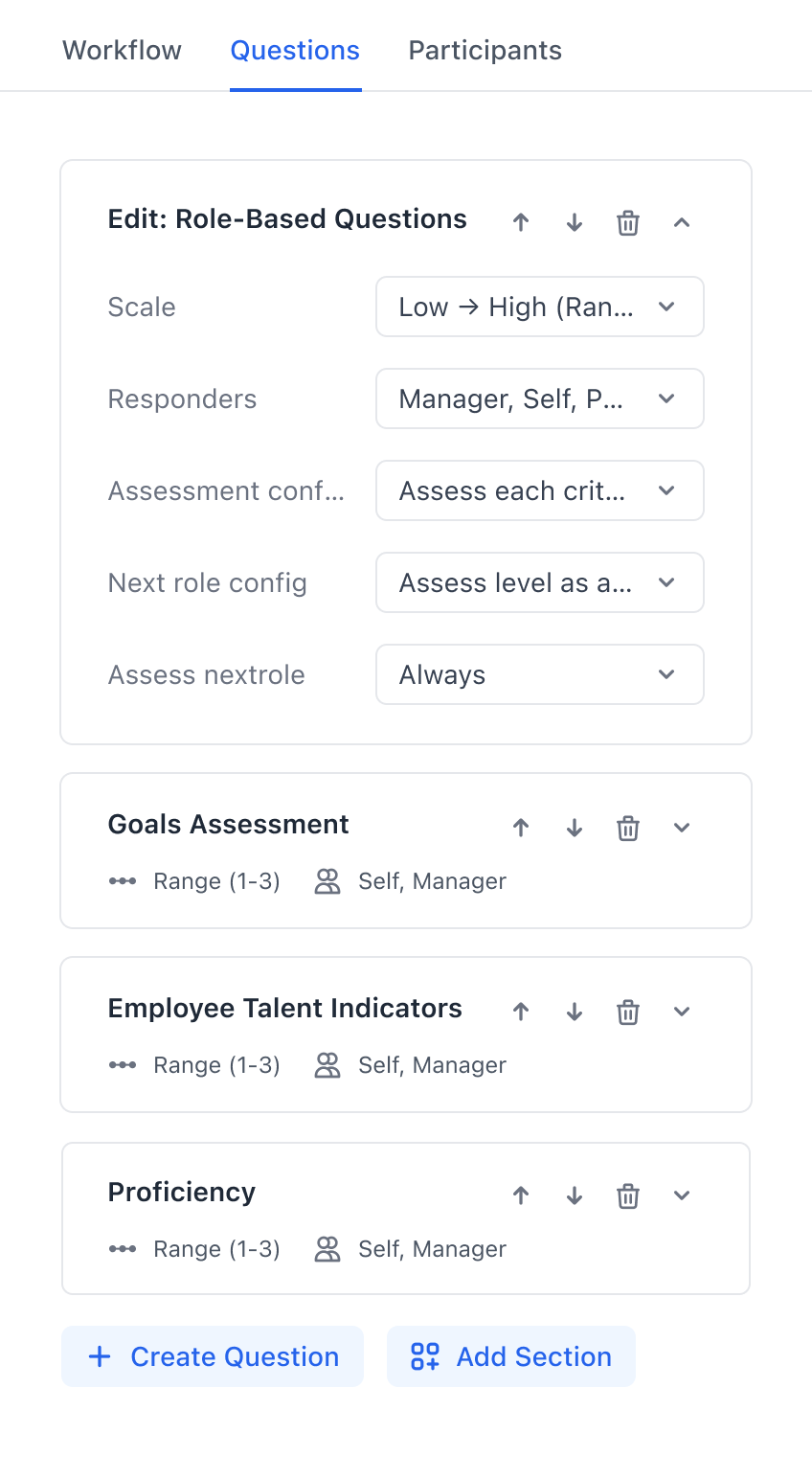
2
For each question, one should be able to define who responds, who it is visible to, and where it shows up in the review.
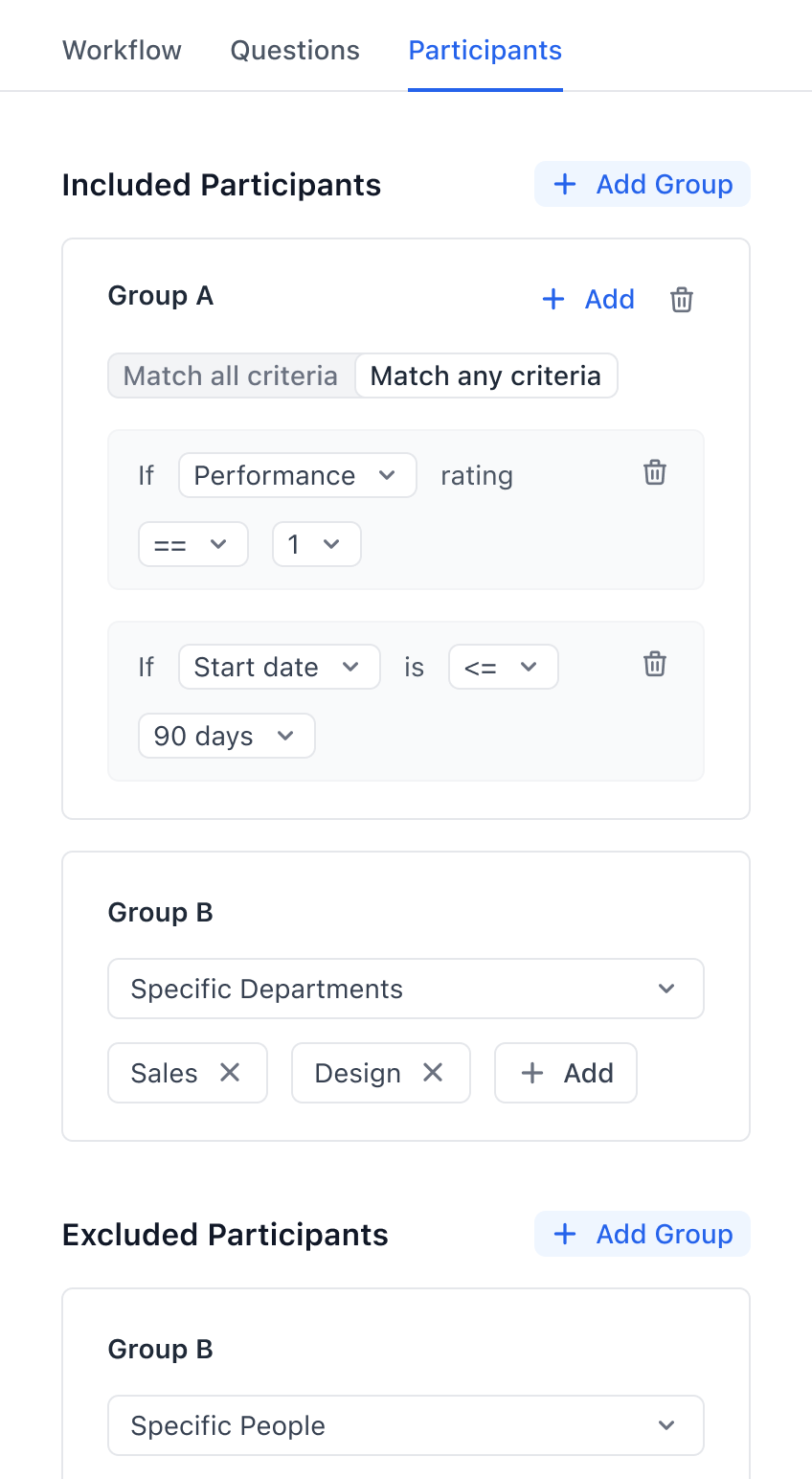
3
Admins should be able to define custom rules for participant selection, including past review data, survey data, goal statuses and demographic information.
The configuration screens below prioritize functionality over visual polish — a deliberate choice, since only 2–3 admins per organization would use them. I focused on clear information hierarchy, and grouped related settings together to ensure admins could set up complex review workflows without needing documentation.
Outcome: Landing New Customers
This flexibility became our core differentiator. Organizations that had outgrown rigid competitors, came to us specifically because we could accommodate how they actually worked.
The most compelling evidence was when we landed 3SS (~400 employees), and Tools For Humanity (~600 employees) — our two largest customers. Both had left established products due to those platforms being unable to support their specific review processes. We worked with their HR teams to build solutions other products weren’t willing to address.
Problem #3: Making Sense of All the Data
Performance reviews generate a lot of data, and every stakeholder — from HR admins to executives, to the reviewees themselves — need to interact with it differently. This problem focuses on the reporting view that shows every employee in the company’s review data, and details.
Fitting Everything Into One View
Rather than spreading functionality across multiple pages, I designed a single reporting view that could serve all of these stakeholders. The principle was the same as the review experience: provide high-level information at a glance, with the ability to drill into details without leaving the page.
1
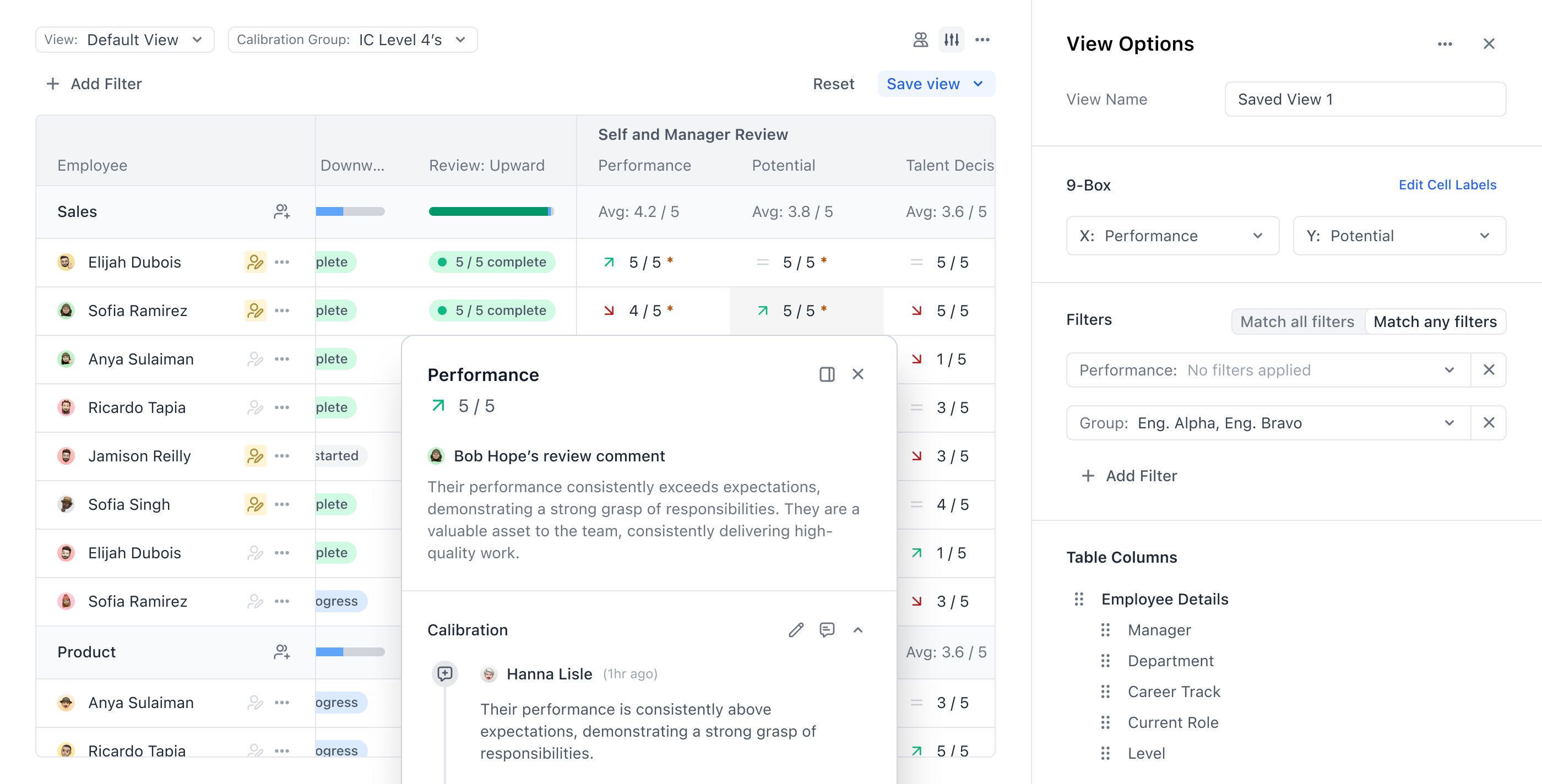
Must be able to filter, sort, organize columns, and save custom views.
2
Ability to see progress related to each individual, as well as employee details.
3
Comment on ratings, modify ratings, and easily see which ratings have been modified.
4
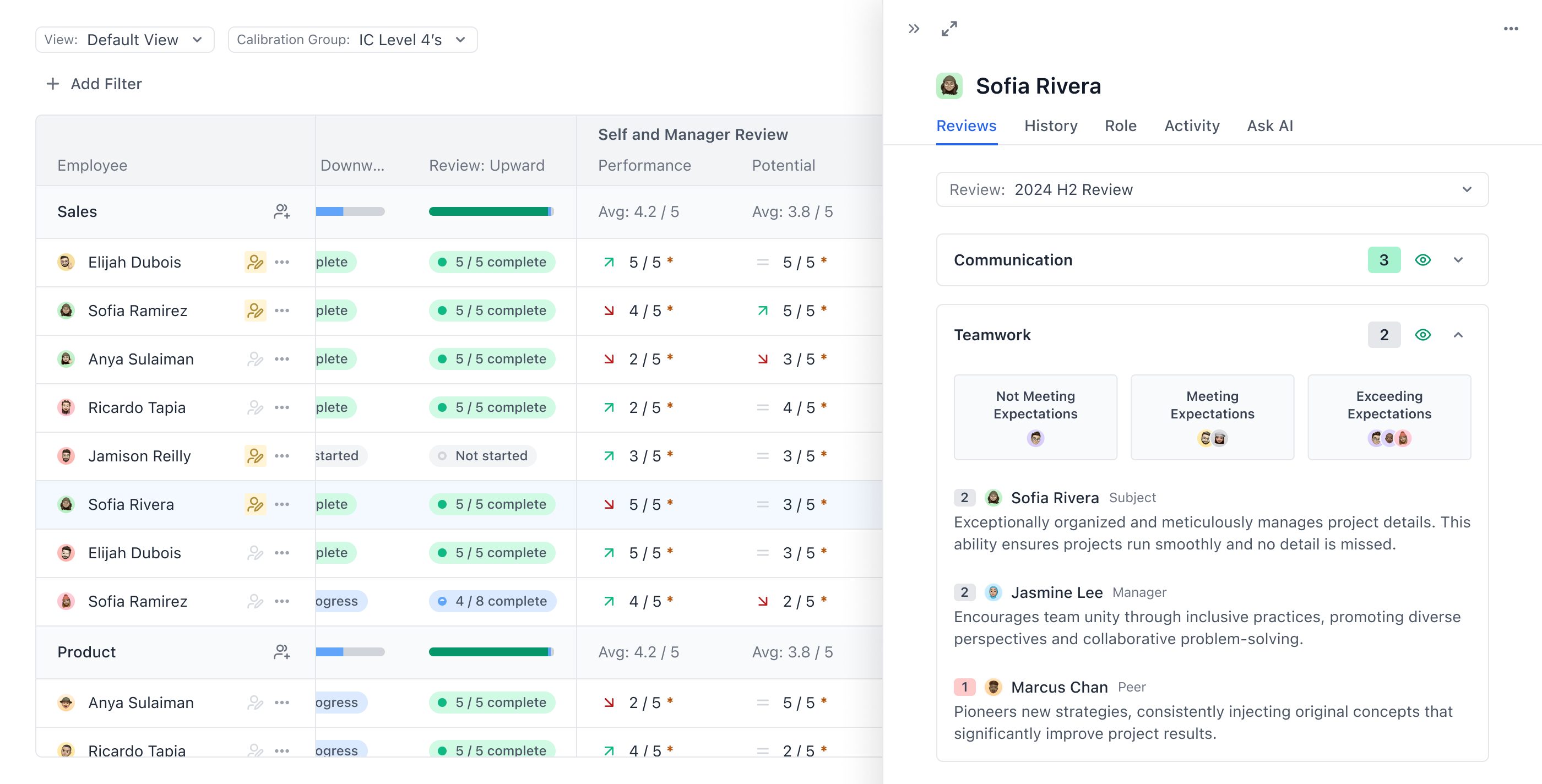
Ability to view the full review, as well as other contextual data that relates to the subject of the review.
5
Control permissions of who can see which people's data, and create groups that define these permissions.
From this view (screenshot below), users can modify ratings, leave comments, filter and sort data, save custom views, and define permissions.
Let's Dive Deep
This is a screenshot showing the drawer that opens when you click on an employee in the reporting view. It allows you to access the relevant review, as well as any other data that was provided for the people filling out the review. It was important that the context and visibility given during the review wasn't lost when users analyze the data from the entire review process.
Outcome: From Spreadsheets to Scalable Processes
Many of the teams that came to Topicflow had been running their entire review process through spreadsheets — manual, error-prone, and slow. The established tools in the space had high churn rates because they couldn’t flex to match how organizations actually operated.
Retaining Every Customer
Performance reviews were Topicflow’s core product and main selling point. During my two years at the company, we retained every customer that we gained. Multiple customers confirmed that the flexibility of our processes allowed them to spend less time managing the tool, and more time on what actually matters in a performance review — the people.
 Topicflow
 Product Designer
 Product Manager
 Customer Success
 Vancouver, BC (Hybrid)
 2024
2024